IncLens
A terminal-based C++ include inspector that reads a preprocessed .ii file and visualizes include relationships as either a navigable tree or a flamegraph.
Overview
IncLens is a terminal UI for exploring C++ include relationships from a preprocessed translation unit.
The tool reads a .ii file produced by g++ and turns it into something that is much easier to inspect. Instead of staring at a long preprocessed file and trying to mentally reconstruct where everything came from, you get an interactive view of the include hierarchy and a second view that emphasizes relative size. Both views are aimed at the same practical question: what code ended up in this translation unit, how did it get there, and which parts of that expanded result carry most of the weight.
That makes IncLens useful in a fairly specific part of the workflow. It is not trying to replace the compiler, edit source files, or act as a general-purpose C++ IDE. The scope is narrower than that. Once preprocessing has already happened, the tool gives you a way to inspect the resulting include structure without having to work directly with the raw expanded text.
The input model
IncLens starts from a simple assumption: the preprocessed file already contains the information you need, but the raw form is difficult to work with directly. A translation unit may pull in a large amount of transitive content, and while that information is technically present after preprocessing, it is not presented in a way that is pleasant to explore line by line.
A
.iifile is the fully preprocessed C++ source after#includeexpansion and macro processing. IncLens treats that as a data source for include analysis instead of as something meant for humans to read line by line.
This choice keeps the scope narrow and concrete. The tool works from the artifact that the compiler already produced rather than trying to parse an entire project directly. In practice that means you can point it at one translation unit at a time and inspect the include relationships that actually participate in that compile, which is often the exact level of detail you want when you are trying to understand where size or complexity is coming from.
What the two views show
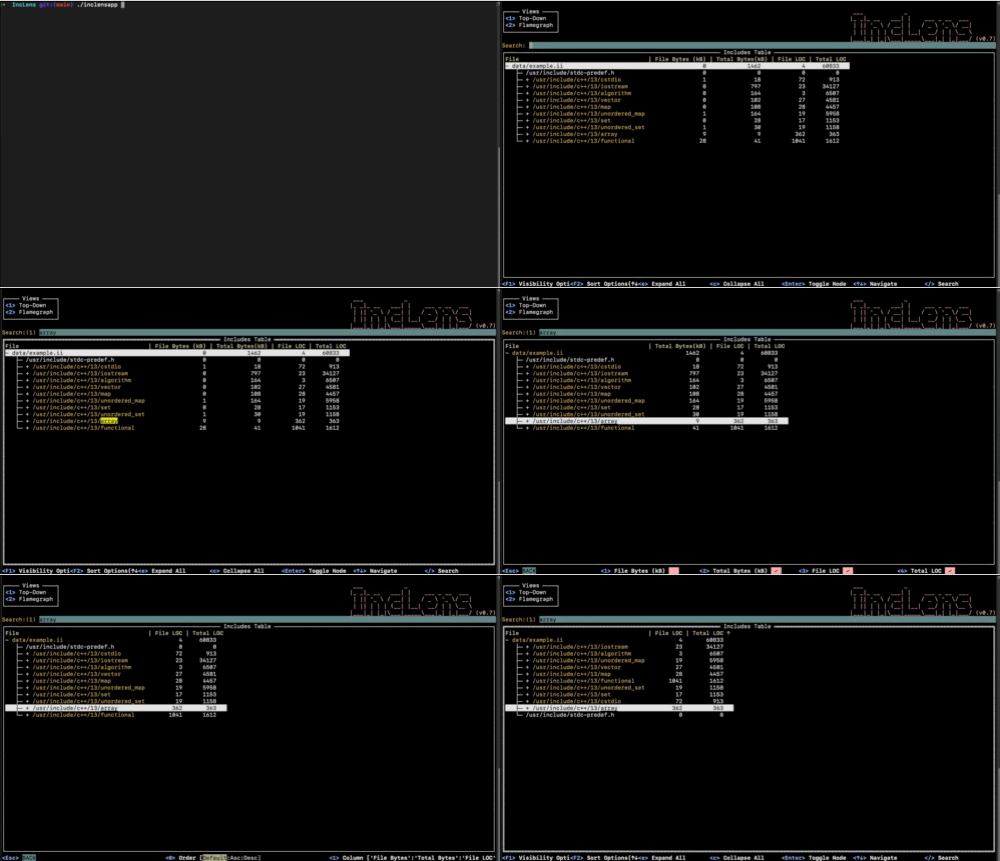
The tool offers two complementary views of the same translation unit. The tree view is the more literal one. It shows the include hierarchy directly, which makes it the natural starting point when you want to understand which headers include which other headers and how a particular branch expands through transitive includes. In that mode the interaction is mostly about navigation and inspection: expanding or collapsing nodes, searching through the hierarchy, jumping between matches, and changing visible columns or sort order so the tree is not only descriptive but also useful for comparison.
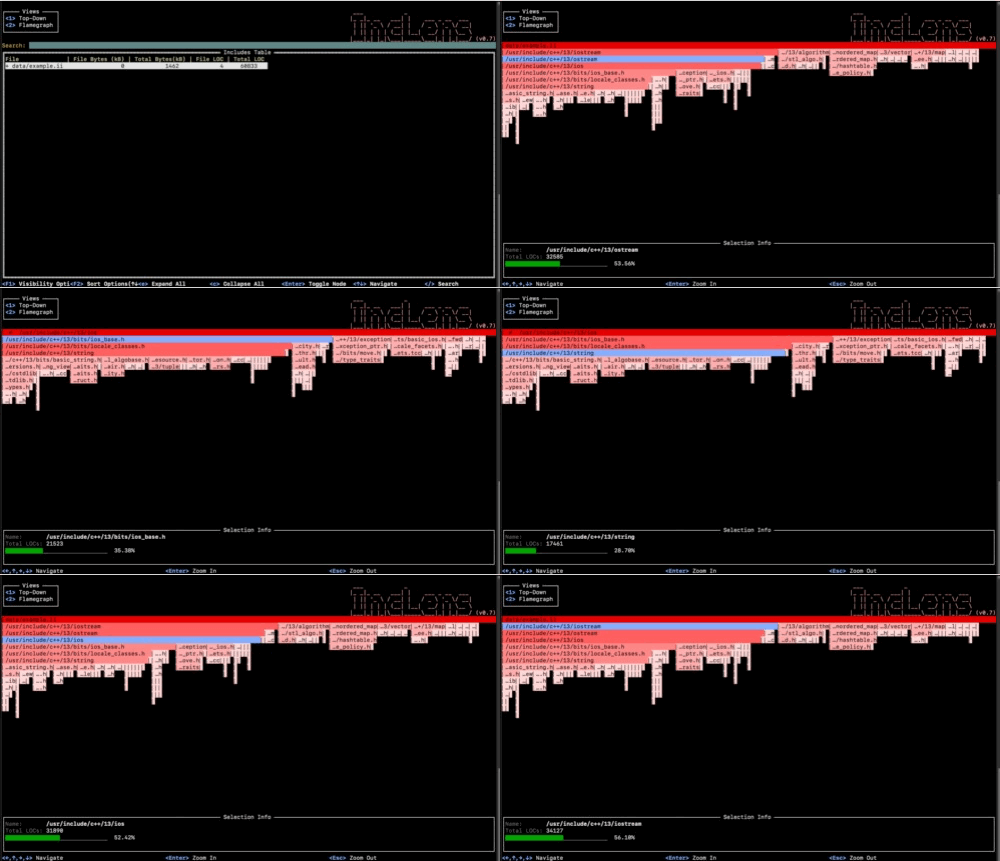
The flamegraph view approaches the same data from a different direction. Instead of emphasizing exact parent-child structure first, it emphasizes proportional weight based on total lines of code. That makes it easier to answer a slightly different question: not only where the hierarchy goes, but which parts of it dominate the expanded translation unit. Arrow-key navigation, zooming in with Enter, zooming out with Esc, and checking the current file name and line count in the information area make that view practical rather than decorative.
Together, the two views cover the two situations I would care about most. Sometimes I want to walk the hierarchy directly and understand why a particular header appears where it does. At other times I want to identify the branches that occupy disproportionate space so I can decide what deserves a closer look. IncLens keeps both tasks close to the same data instead of treating them as separate tools.
Where it can be useful
IncLens is most useful once the include graph is large enough that reasoning about it mentally becomes inconvenient. That can happen when you are opening an unfamiliar translation unit in a large codebase, when a compile seems to be pulling in much more code than expected, or when you want to see whether a refactor around header boundaries actually changed the expanded shape of the program. It is also a practical way to inspect third-party dependencies that bring in long include chains and to identify headers that contribute a large amount of transitive content even if they do not look especially heavy from the original source.
I also see it as a companion to other compile-time investigation tools rather than a replacement for them. A build trace, timing report, or profiler can tell you that a translation unit is expensive. IncLens helps answer a more structural question afterward by showing how the expanded include graph is arranged and where the larger branches are concentrated.
Workflow and interaction
The workflow is short and explicit. First, generate a preprocessed .ii file with the compiler. Then run IncLens against that file and move between the tree view and the flamegraph depending on whether you want exact structure or a better sense of proportional size. The setup stays small as well: clone the repository, run ./setup.sh, and use Go 1.20 or newer.
g++ -E -o example.ii example.cpp./inclensapp -file example.iiThe keyboard controls are an important part of why the interface works. In the tree view, Enter, e, and c manage expansion and collapse, / and n support searching through the graph, and F1, F2, 0, and 1 let you change visible columns and sorting. In the flamegraph, the interaction is simpler: move with the arrow keys, zoom in with Enter, and step back out with Esc. None of that is flashy, but it gives both views the amount of control they need to be useful in a real terminal session.
Scope
One thing I like about the project is that the scope stays clear throughout. It focuses on one stage of the C++ workflow, preprocessing, and tries to make that stage easier to inspect without expanding into a much larger system. It stays in the terminal, uses a real compiler artifact as input, and gives two views that answer different questions about the same translation unit. That keeps it easy to place in an existing workflow because the setup is small, the input is explicit, and the job of the tool remains narrow enough to stay understandable.